Give your agent your email. Not your mailbox.

Mailvec keeps a synced copy of your mailbox on a machine you control, indexes every message and attachment, and lets Claude or any MCP client search it by keyword and by meaning. Agents read only what they ask for; they can't send, reply or delete. Embeddings and OCR run locally.

Open source · Self-hosted · Any IMAP server Any MCP client: Claude Desktop · Claude Code · claude.ai · your own agent
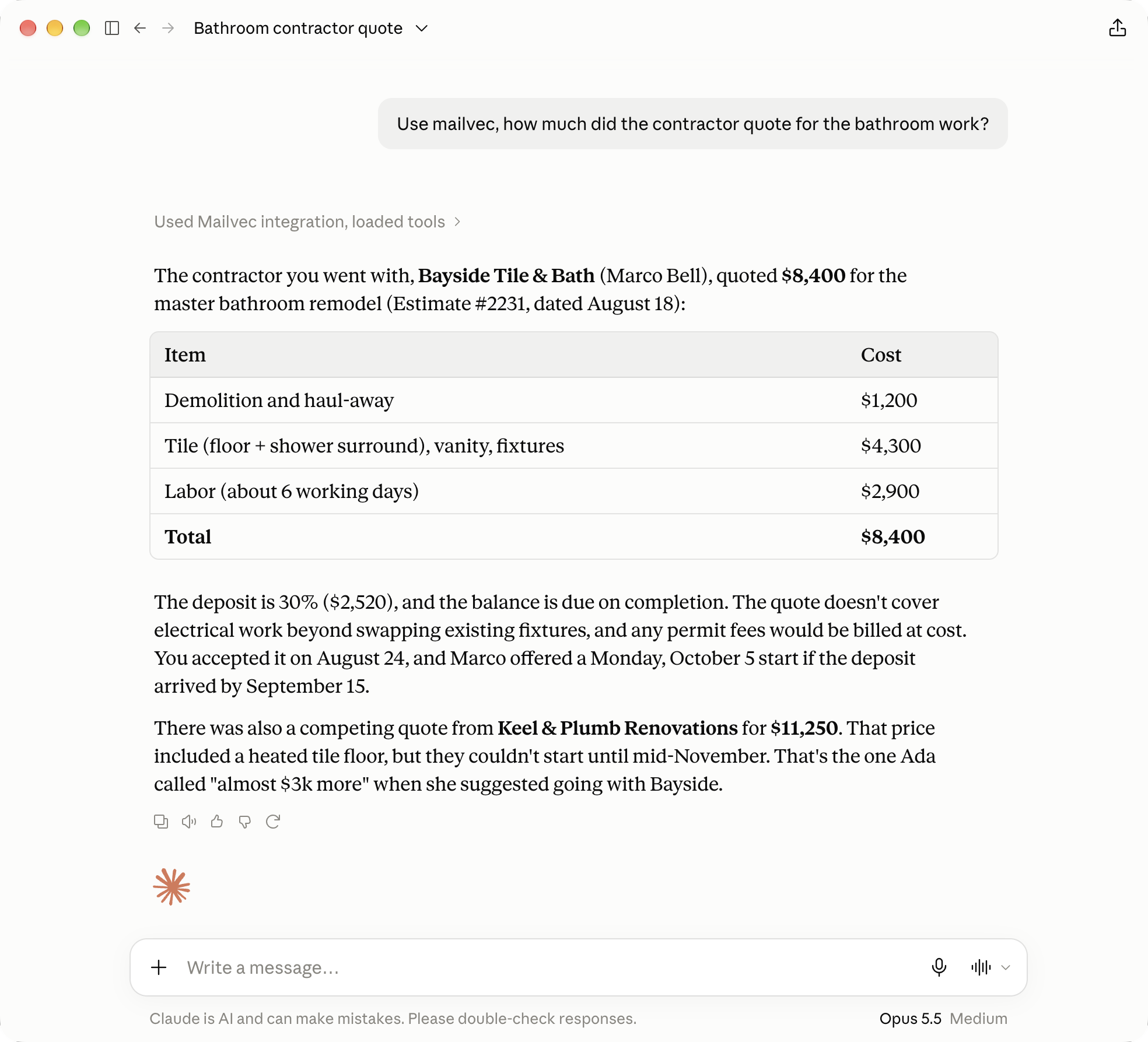
Claude Desktop answering 'how much did the contractor quote for the bathroom work?' with an itemised table: demolition $1,200, tile and fixtures $4,300, labor $2,900, total $8,400, from Bayside Tile & Bath's Estimate #2231.
The table came from Bayside-Estimate-2231.pdf, an attachment. Shown in Claude Desktop with a synthetic mailbox; every MCP client gets the same tools.

mvMail, plus a vector. The arrow over the mv is the mathematician's notation for one.

01 · The problem

The answer is in your email somewhere.

The quote is in a PDF attached to a reply in a thread from March. Your mail client's search wants the exact word, and you remember the meaning. And the AI tools that could find it want you to hand your whole mailbox to one more company.

contractor quote
Webmail search · 0 results for contractor quote
the one you meant, which never says "quote"
Marco Bell · Bayside Tile & BathAug 18
Estimate #2231 - master bathroom remodel
Hi Sam, Thanks for walking me through the space on Friday. The estimate for the master bathroom is attached …
Bayside-Estimate-2231.pdf · "Master bathroom remodel … TOTAL $8,400.00"
02 · How it works

Mail flows one way. Your agent reads your copy.

Mailvec keeps a complete, continuously-synced copy of your mailbox. mbsync pulls mail from your IMAP server. The indexer reads every message and extracts text from attachments. The embedder turns it into vectors with a local model, and OCRs scanned documents. Your AI agent asks questions through the MCP server. New mail arrives on a timer (every minute on the server install, every ten on a Mac), or within seconds with IMAP push on the server.

outsideYour mail provider (IMAP)
your hardware
syncmbsyncIMAP push optional
filesMaildirone file per message
parseIndexerbodies + attachment text
store · SQLiteArchivekeyword index + vector index
vectorsEmbeddervectors + OCR of scans
local modelOllama
read-onlyMCP server8 read tools
asksYour AI agentClaude or any MCP client
Mailvec everything else on your hardware Agents read the copy, never your provider.
04 · What it does

Search by meaning

Keyword and semantic search fused into one ranking. Exact matches and paraphrases both land.

How →

Reads the attachments

PDFs, Word, Excel, PowerPoint, calendar invites and contacts are indexed, not just their filenames.

How →

Reads the scans too

Scanned PDFs and photographed documents are OCR'd by a local vision model and become searchable.

How →

Your mail stays home

Your mailbox lives on your machine. Embeddings and OCR run locally by default; hosted providers are opt-in.

How →

Look, don't touch

Agents can search and read. They can't send, reply, move or delete. Mark-as-read is a separate opt-in on the server install.

Any agent that speaks MCP

Claude Desktop, Claude Code, claude.ai or your own agent, over stdio or HTTP. One server you control.

Clients →

Always current

New mail syncs on a timer, or within seconds with IMAP push. Search results say how fresh the copy is.

Filters agents can use

Folder, date range, sender, recipient, has-attachment, attachment type, unread. Works with or without a query.

05 · What you can ask

If it's in your mail, you can ask about it.

Pick a question to see the tool call your agent makes. Calls and results are from the demo mailbox; the same calls work from any MCP client.

chat
How much did the contractor quote for the bathroom?
tool call search_emails(query: "contractor quote bathroom")
Top five: Keel & Plumb's $11,250 quote, the three messages about Bayside's Estimate #2231 ($8,400), and Ada's note comparing the two.
06 · Attachments

Attachments, not just emails.

Mailvec extracts the text from PDFs, Word documents, spreadsheets, slides, calendar invites and contact cards, and indexes it with the email. When a search hit came from an attachment, the result says which one. An agent can read the extracted text, or look at a rendered page when the layout matters: tables, forms, signatures.

What happens to each attachmentby file type
Bayside-Estimate-2231.pdf text layer, extracted searchable text scan-2025-03-14.pdf render → qwen2.5vl:7b searchable text IMG_0412.jpg inline same OCR path searchable text statement-2025-02.pdf password-protected can't read (encrypted)
It reports what it couldn't read instead of skipping it quietly.

Scans too.

A scanned PDF has no text to extract. Mailvec's embedder renders each page and transcribes it with a local vision model (qwen2.5vl:7b through Ollama), then indexes the result like any other text. Photos of documents pasted into emails get the same treatment.

A hosted OCR provider is available if you want it faster; it's off unless you turn it on.

How much was the compost on that scanned receipt?
get_attachment_text · scan-2025-03-14.pdf · OCR text Greenleaf Garden Centre, receipt 20931: two 40 L bags of compost at 6.50 each, total 13.00. demo mailbox · transcribed by qwen2.5vl:7b
07 · Privacy

Private by design.

Your mail is copied to a disk you own and indexed there. By default nothing leaves your network except the IMAP sync itself: embeddings and OCR run on your own Ollama. On a single Mac the server only listens on localhost. On a Docker host it publishes no ports at all; remote clients such as claude.ai and the Claude iPhone app reach it through a Cloudflare Tunnel behind Cloudflare Access, which can be checked again at the server. Hosted embedding and OCR providers exist for people who want them, and each one is an explicit opt-in.

Mail provider
Fastmail, Gmail, iCloud…
IMAP sync
your hardware · stays here
Mail copy
Maildir
Index
SQLite + vectors
Ollama
embeddings + OCR
MCP server
read-only
Your MCP clients
localhost only
No inbound path at all. The server listens on 127.0.0.1.
Hosted embeddings OPT-IN
Hosted OCR OPT-IN
solid: the default path dashed + OPT-IN: leaves your network only if you turn it on
08 · How it's built

Built for hostile mail.

Anyone can send you an email, so Mailvec treats every message as hostile input. In the Docker deployment, all parsing of mail, HTML, PDFs, Office files and images happens in a separate container with no access to your archive, no credentials and no network route out. Only the sync container holds your mail password. Services run as non-root users with dropped privileges and memory limits. And the server's instructions and every tool description tell the AI that mail content is data from the sender, never instructions.

That last part is a framing, not a guarantee. An agent that can read your mail can be shown a malicious email. Connect Mailvec only to clients you'd trust with your whole mailbox.

can see your mail
mbsync
holds the mail password; the only route to IMAP
indexer
reads the Maildir
embedder
talks to Ollama
MCP server
answers Claude
sends .eml bytes
calls out: refused
parse · reads mail, HTML, PDF, Office, images
no archive no mail folder no credentials no internet

Built to be left running.

Mailvec runs unattended for months. The hard part of that is the failures that don't throw an error: they quietly give wrong answers. A few it now catches:

−40% in one scan held 1 h

A half-mounted drive looks exactly like deleting your mail.

If one scan would remove a large share of the archive at once, Mailvec holds the deletion for an hour in case the files come back.

new digest stop

Same model name, different weights.

If the embedding model changes underneath it, even under the same tag, Mailvec stops instead of mixing two incompatible vector spaces and returning plausible-looking nonsense.

467 GB/day 0 writes

467 GB a day to look at unchanged mail.

The indexer once rewrote a row per message on every one-minute scan. An unchanged mailbox now costs zero writes, and a test checks for exactly zero.

429 retry, not "unreadable"

A busy provider is not a broken document.

A rate-limited OCR service never causes a good scan to be marked unreadable; only a real, repeatable failure does.

09 · Proof

Measured, not claimed.

1,400+tests
8read tools, and nothing that sends
~80,000messages in daily use
0.92hybrid search NDCG@10

Hybrid beats either leg alone

NDCG@10
Keyword0.859 Semantic0.814 Hybrid0.916
Recall@10
Keyword0.940 Semantic0.913 Hybrid0.977
0.75 (axis start)1.00
70 labelled queries over one person's real ~80k-message mailbox, top 10 results. Your numbers will differ. The mailvec eval tool lets you measure your own.

Gmail behaviour is tested against recordings from a real Gmail test account, re-recorded weekly in CI. OCR engines were compared head to head before choosing a default.

the author's server · Docker installreal run · 2 addresses redacted
$ docker compose exec mcp mailvec doctor

Mailvec preflight
=================

Configuration
  ✓ Version             v0.12.1 (cli + mcp in lockstep)
  ✓ Embedding profile   ollama-legacy (ollama, provider ollama) — mxbai-embed-large @1024d, space ollama:mxbai-embed-large:1024
  ✓ Database            /data/archive.sqlite (4.51 GB)
  ✓ Schema              version 14 (current)
  ✓ sqlite-vec          /app/cli/vec0.so
  ✓ Maildir root        /mail/Fastmail

Pipeline
  ✓ Embedding model     mxbai-embed-large (1024d, matches config)
  ✓ Embedding cover     79,446 / 79,446 messages (100.0%, 330,066 chunks)
  ✓ Last indexed        2026-11-10 14:45 (4m ago)
  ✓ Ollama              reachable at http://‹redacted›:11434 (configured model: mxbai-embed-large)
  ✓ Orphan vectors      none
  ✓ Parser              remote parse service at http://parse:3400 answers /up
  ✓ OCR model           mistral-ocr mistral-ocr-4-0 @ https://‹redacted› — configured; no credentials in this process by design. Check it where OCR runs: `docker compose exec embedder mailvec doctor`.

Services (compose)
  ✓ mbsync sync         last successful sync 14s ago
  ✓ Supervisor          compose (no launchd in a container)
  ✓ mbsync stderr       n/a in a container — the sidecar writes stderr to `docker compose logs mbsync`. Sync outcome is covered by the `mbsync sync` check.

External tools
  ✓ mbsync              n/a — IMAP sync runs in the mbsync sidecar container

MCP
  ✓ MCP /health         200 ok (http://127.0.0.1:3333/health)

18 pass, 0 warn, 0 fail
All clear.
MailFastmail · Gmail · iCloud · any IMAP server (via mbsync)Fastmail results link straight to the message.
ClientsAny MCP client, local over stdio or HTTP, remote over OAuth: Claude Desktop · Claude Code · claude.ai · Claude for iPhone · your own agent
GuidesStep-by-step setup for Claude Desktop, Claude Code and claude.ai. Other local clients use the generic stdio launcher or http://127.0.0.1:3333. Pair it with a local model and nothing leaves the machine at all.
10 · Get started

Two ways in. Pick where your mail should live.

Apple Silicon · macOS 14+

One Mac

Install mbsync and Ollama with Homebrew, sync your mail, run one installer, connect Claude Desktop, Claude Code or any local MCP client. Everything stays on the Mac.

Mac guide →
Linux · Docker Compose

Always-on server

A Linux host with Docker Compose and an Ollama machine on your network. Build locally or pin the published images. Add a Cloudflare Tunnel and Access to reach it from remote clients like claude.ai and your phone.

Server guide →
No real mail needed

Just looking?

A synthetic demo mailbox generator lets you run the whole pipeline with no real mail.

Demo mailbox →

Then ask your agent about an email you know exists.

git clone https://github.com/djdelaney/Mailvec && cd Mailvec
brew install --cask dotnet-sdk
brew install isync jq
brew install --cask ollama-app && open -a Ollama
ollama pull mxbai-embed-large
ollama pull qwen2.5vl:7b          # local OCR, about 6 GB
security add-generic-password -a you@fastmail.com -s mbsync -w   # app password, into the Keychain
cp -n ops/mbsyncrc.example ~/.mbsyncrc   # -n keeps a config you already have
chmod 600 ~/.mbsyncrc
$EDITOR ~/.mbsyncrc
mbsync -aV                        # first sync can take hours
./ops/install-all.sh
mailvec doctor
Trimmed from the getting-started guides. The Docker stack will not start until you add your IMAP password file.

Requirements

  • An IMAP account and an app password
  • Ollama with mxbai-embed-large, plus qwen2.5vl:7b (about 6 GB) for local OCR
  • .NET 10 SDK (Mac) or Docker Compose (server)
  • Roughly 4–5 GB of disk per 75,000 messages, plus the mail itself

Expect a wait. The first sync and embedding pass on a large mailbox can take hours or days. Keyword search works from the start.

Limits, plainly.

It is
  • One mailbox, one owner
  • Read-only for agents
  • Self-hosted
  • Pre-1.0 and actively developed
It isn't
  • A mail client: no GUI, nothing to send with
  • Multi-user
  • Encrypted at rest by itself (use disk encryption)
  • Tuned for Chinese, Japanese or Korean keyword search yet
  • A hosted service with a signup